
HP Chromebook 14 Laptop Review: A Lightweight and Affordable Everyday Companion
The HP Chromebook 14 Laptop is designed for students, professionals, and casual users who need a reliable, lightweight, and budget-friendly laptop. Powered by the Intel Celeron N4000 processor, 4GB RAM, and 32GB eMMC storage, this Chromebook is best suited for browsing, streaming, and cloud-based applications. But does it live up to expectations? Let’s take a detailed look at its features, performance, and overall value.

Key Specifications HP Chromebook 14 Laptop
- Processor: Intel Celeron N4000 (Dual-Core)
- RAM: 4GB DDR4
- Storage: 32GB eMMC
- Display: 14-inch HD (1366 x 768) micro-edge screen
- Operating System: Chrome OS
- Graphics: Intel UHD Graphics 600
- Battery Life: Up to 13 hours
- Connectivity: Wi-Fi, Bluetooth, USB-C, USB-A, microSD card slot
- Weight: Approx. 3.4 lbs
- Webcam & Dual Mics: Ideal for video conferencing
Table of Contents
Design and Portability
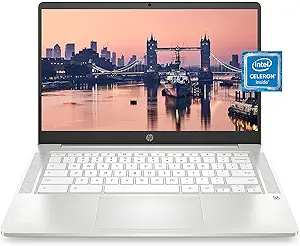
The HP Chromebook 14 has a sleek and modern design with a compact form factor. Weighing just 3.4 lbs, it is highly portable and perfect for on-the-go users. The micro-edge display reduces bezels, providing a more immersive viewing experience. Despite its plastic build, it feels durable enough for daily use, making it a great choice for students and travelers.
Display and Visual Experience HP Chromebook 14 Laptop
The 14-inch HD screen delivers decent brightness and color accuracy for a budget Chromebook. While it is not Full HD, the micro-edge display improves the screen-to-body ratio, making the viewing experience more immersive. The anti-glare coating helps reduce reflections, making it easier to work in bright environments.
Performance and Usability
Equipped with an Intel Celeron N4000 processor and 4GB RAM, the HP Chromebook 14 is optimized for basic tasks such as web browsing, streaming, document editing, and using cloud-based apps like Google Docs and Sheets. Thanks to Chrome OS, the laptop runs efficiently, with fast boot-up times and access to the Google Play Store for additional apps. However, it is not suited for intensive multitasking or gaming.
Storage and Cloud Integration
With 32GB eMMC storage, local storage is limited, but Google Drive integration ensures that users can store files in the cloud. The microSD card slot provides additional storage expansion if needed. Chrome OS also offers automatic updates and built-in virus protection, enhancing security and reliability.
Battery Life and Connectivity
One of the standout features of the HP Chromebook 14 is its long battery life, lasting up to 13 hours on a single charge. This makes it an excellent choice for users who need a device that lasts throughout the day. The laptop also includes multiple connectivity options, such as USB-C, USB-A, Bluetooth, and Wi-Fi, ensuring compatibility with various peripherals.

Pros and Cons
| Pros | Cons |
|---|---|
| ✅ Lightweight and portable design | ❌ Limited internal storage (32GB eMMC) |
| ✅ Affordable and budget-friendly | ❌ Not suitable for high-performance tasks |
| ✅ Long battery life (up to 13 hours) | ❌ HD display, not Full HD |
| ✅ Seamless Chrome OS experience | ❌ Plastic build |
| ✅ MicroSD card slot for storage expansion |
Pricing
| Retailer | Price |
|---|---|
| Amazon | At amazon |
| Best Buy | $136.61 at amazon |
| Walmart | |
| HP Official Store |
(Prices may vary based on availability and promotions. Click [here] to check the latest deals!)
Final Verdict
The HP Chromebook 14 Laptop is a great choice for users looking for a lightweight, affordable, and efficient laptop for everyday tasks. While it may not be suited for demanding applications, it excels in basic productivity, web browsing, and media consumption. If you’re in the market for an entry-level Chromebook with long battery life and cloud integration, this is a solid option. Click [here] to check the latest deals on Amazon!
Final Thoughts: HP Chromebook 14 Laptop Review
After thoroughly examining the HP Chromebook 14, it is clear why this laptop continues to be a popular choice for students, professionals, and everyday users. In this HP Chromebook 14 Laptop Review, we’ve explored its design, performance, battery life, display, and overall value. Now, let’s focus on the final thoughts to help you decide whether this lightweight Chromebook is the right fit for your daily needs.
One of the standout features of the HP Chromebook 14 is its portability. Weighing just under 3 pounds and featuring a slim profile, it is incredibly easy to carry around. Whether you are moving between classrooms, offices, or coffee shops, the Chromebook 14 fits comfortably in your backpack without adding unnecessary weight. Its durable construction ensures that it can withstand everyday wear and tear, making it a reliable companion for years to come.
The performance of the HP Chromebook 14 is impressive for its price range. Equipped with Intel processors and integrated graphics, this laptop handles web browsing, document editing, streaming, and light multitasking effortlessly. The Chrome OS operating system enhances this experience by offering fast boot times, automatic updates, and a clean, user-friendly interface. While it may not be suitable for heavy gaming or resource-intensive software, the Chromebook 14 excels at performing everyday tasks efficiently, making it an ideal choice for students and casual users.
Battery life is another critical factor that sets the HP Chromebook 14 apart. Users can expect up to 10–12 hours of usage on a single charge, which is sufficient for a full day of school, work, or travel. This extended battery life reduces the need to carry a charger constantly and allows users to stay productive on the go. Energy-efficient hardware combined with Chrome OS optimization ensures consistent performance without compromising battery longevity.
The keyboard, touchpad, and display also contribute to a positive user experience. The keyboard is comfortable and well-spaced, making long typing sessions easy and less tiring. The touchpad is responsive and supports multitouch gestures, adding convenience when navigating the Chrome OS interface. The 14-inch HD display provides clear visuals with decent brightness and color reproduction. While it may not meet the needs of professional graphic designers or video editors, it is more than adequate for streaming, video calls, online learning, and everyday browsing.
Connectivity options are plentiful on the HP Chromebook 14. It includes USB-C, USB-A, a headphone jack, and microSD card support, along with Wi-Fi 6 and Bluetooth for fast, stable wireless connections. This variety allows users to connect external devices and accessories seamlessly, whether it’s for school, work, or personal use.
Affordability is one of the most significant advantages highlighted in this HP Chromebook 14 Laptop Review. Despite its sleek design, reliable performance, and long battery life, the Chromebook 14 is priced competitively, making it accessible to students, professionals, and casual users alike. For those on a budget, it offers excellent value without compromising essential features or user experience.
In conclusion, the HP Chromebook 14 Laptop proves to be a lightweight, reliable, and affordable everyday companion. Its combination of portability, performance, battery life, and user-friendly features make it one of the best choices in its category for 2025. Whether you need a device for online learning, remote work, casual browsing, or multimedia streaming, this Chromebook meets the needs of most users efficiently.
Choosing the HP Chromebook 14 means investing in a laptop that is simple to use, easy to carry, and powerful enough for daily tasks. It is an excellent choice for anyone looking for a dependable Chrome OS laptop that balances performance and affordability.
Frequently Asked Questions (FAQ) – HP Chromebook 14 Laptop Review
Q1: What is the HP Chromebook 14 Laptop?
A: The HP Chromebook 14 Laptop is a lightweight, portable device designed for everyday computing tasks. It runs on Chrome OS, offering fast performance, automatic updates, and a secure environment for students, professionals, and casual users. Its 14-inch display, long battery life, and affordable price make it a popular choice in 2025 for those looking for a reliable and easy-to-use laptop.
Q2: How is the performance of the HP Chromebook 14?
A: The HP Chromebook 14 features Intel processors and integrated graphics that handle web browsing, document editing, streaming, and light multitasking efficiently. Chrome OS enhances the experience with quick boot times, smooth operation, and minimal lag. While it is not designed for heavy gaming or resource-intensive applications, it excels at everyday tasks, making it an ideal laptop for students and casual users.
Q3: How long does the battery last on the HP Chromebook 14?
A: The laptop offers up to 10–12 hours of battery life on a single charge. This makes it perfect for a full day of classes, work, or travel without needing to recharge frequently. Its energy-efficient hardware and Chrome OS optimization contribute to the impressive battery performance.
Q4: What is the display quality like on the HP Chromebook 14?
A: The 14-inch HD display provides clear visuals with decent brightness and color reproduction. It is perfect for streaming, video calls, online learning, and general browsing. While it may not meet the needs of professional designers or video editors, it satisfies the majority of everyday users looking for a lightweight, affordable laptop.
Q5: Is the HP Chromebook 14 Laptop lightweight and portable?
A: Yes, the HP Chromebook 14 weighs just under 3 pounds and features a slim design, making it extremely portable. Its compact size allows it to fit comfortably in backpacks or laptop bags, making it ideal for students, commuters, and travelers who need a reliable device on the go.
Q6: How is the keyboard and touchpad on the HP Chromebook 14?
A: The laptop features a comfortable keyboard with well-spaced keys, making typing long documents easy and less tiring. The touchpad is responsive and accurate, supporting multitouch gestures for smooth navigation on Chrome OS. Overall, the typing and navigation experience is excellent for a laptop in this price range.
Q7: What ports and connectivity options does the HP Chromebook 14 offer?
A: HP Chromebook 14 comes equipped with USB-C, USB-A, a headphone jack, and microSD card support, along with Wi-Fi 6 and Bluetooth connectivity. This variety of ports allows users to connect external devices, accessories, and peripherals easily, making it versatile for school, work, or personal use.
Q8: Is the HP Chromebook 14 good for students?
A: Absolutely. Its lightweight design, long battery life, reliable performance, and affordable price make it an excellent choice for students. Whether it’s for online learning, research, note-taking, or streaming educational videos, the Chromebook 14 provides a smooth and convenient experience.
Q9: Can professionals use the HP Chromebook 14 for work?
A: Yes, professionals who rely on cloud-based applications, web browsing, email, and productivity tools like Google Workspace or Microsoft 365 will find the HP Chromebook 14 highly efficient. It is not suitable for heavy software development or graphics-intensive tasks, but for everyday professional use, it is a dependable choice.
Q10: How secure is the HP Chromebook 14 Laptop?
A: Security is one of the strengths of Chrome OS. The HP Chromebook 14 includes automatic updates, built-in virus protection, and a secure browsing environment. Users don’t need to install additional antivirus software, making it one of the safest laptops for casual and educational use.
Q11: Can I run Android apps on the HP Chromebook 14?
A: Yes, Chrome OS supports Android apps through the Google Play Store. Users can download a wide range of productivity, entertainment, and educational apps, expanding the functionality of the HP Chromebook 14.
Q12: Is the HP Chromebook 14 Laptop suitable for light gaming?
A: The Chromebook 14 is suitable for casual and browser-based games but is not designed for heavy gaming or graphically intensive titles. Cloud gaming services and Android games can run smoothly, making it fine for light gaming entertainment.
Q13: How much storage does the HP Chromebook 14 have?
A: Most HP Chromebook 14 models come with 64GB eMMC storage, with some updated 2025 models offering up to 128GB SSD. Additional storage can be expanded via microSD cards or cloud storage, which is heavily integrated into Chrome OS.
Q14: How easy is it to set up the HP Chromebook 14?
A: Setting up the Chromebook 14 is straightforward. Users just need a Google account to sign in, after which they can start using the device. Automatic updates and simple account syncing make setup nearly effortless, even for first-time Chromebook users.
Q15: Is the HP Chromebook 14 worth buying in 2025?
A: Based on performance, portability, battery life, and affordability, the HP Chromebook 14 is an excellent choice for students, casual users, and professionals relying on web-based applications. It provides a reliable, lightweight, and budget-friendly solution in 2025, making it highly recommended in its category.
Final Verdict: HP Chromebook 14 Laptop Review
After a detailed analysis in this HP Chromebook 14 Laptop Review, it’s clear that the HP Chromebook 14 is a reliable, lightweight, and affordable laptop that meets the needs of students, casual users, and professionals relying on cloud-based applications. Its combination of portability, performance, and long battery life makes it one of the most practical choices in 2025 for anyone seeking a dependable everyday device.
The design and build quality are impressive for a laptop in this price range. It is slim, lightweight, and durable, making it easy to carry around for school, work, or travel. The 14-inch display offers a comfortable viewing experience, while the keyboard and touchpad provide smooth typing and navigation.
Performance-wise, the HP Chromebook 14 excels at web browsing, document editing, media streaming, and light multitasking. Chrome OS enhances the laptop’s efficiency with fast boot times, automatic updates, and a secure environment. While it’s not designed for heavy gaming or professional graphics work, it is perfect for everyday tasks and productivity.
Battery life is another highlight in this HP Chromebook 14 Laptop Review. With up to 10–12 hours of usage on a single charge, users can rely on the Chromebook for a full day of work, study, or travel without interruption. Combined with its energy-efficient hardware and Chrome OS optimization, this makes the HP Chromebook 14 a highly dependable device.
Connectivity options are versatile, including USB-C, USB-A, microSD card support, Wi-Fi 6, and Bluetooth. This variety ensures that users can connect accessories, external storage, and peripherals conveniently. Additionally, Chrome OS supports Android apps, which expands the device’s functionality for work, entertainment, and productivity.
One of the strongest selling points is affordability. Despite its lightweight design, reliable performance, and long battery life, the HP Chromebook 14 is priced competitively, making it accessible to students, casual users, and professionals on a budget.
Final Verdict
Overall, the HP Chromebook 14 Laptop offers exceptional value in 2025. It is the perfect combination of lightweight portability, solid performance, long battery life, and affordability. For students, casual users, and professionals looking for a dependable Chrome OS laptop, this device is highly recommended.
If your priorities are simplicity, reliability, and a device that can handle everyday tasks efficiently, the HP Chromebook 14 stands out as one of the best Chromebook options of 2025. It provides a smooth user experience, excellent battery performance, and versatile connectivity, all at a reasonable price point.
For those seeking a lightweight and budget-friendly Chromebook for daily use, the HP Chromebook 14 is undoubtedly a top choice. It’s a practical, portable, and efficient laptop that ensures you stay productive and entertained without breaking the bank.
1 thought on “HP Chromebook 14 Laptop Review: A Lightweight and Affordable Everyday Companion”